Showing posts with label iDiscover. Show all posts

Thursday, 3 November 2022

Tracking your borrowing activity using My Library Account in iDiscover

 At the start of every month you should receive a BORROWING ACTIVITY SUMMARY email. It should look something like this:
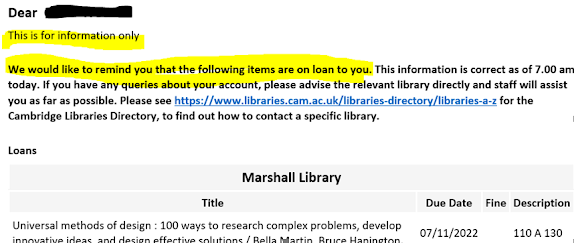

This is nothing to worry about - it is simply a reminder to let you know which books you have out on loan. Although the email shows a due date for the book all your loans will automatically renew and you can keep the books for as long as you need to. Either until you have finished reading them or until the book is requested to be recalled by another reader.

Do be sure to bring the book back if this happens. We do not fine you any longer but you could find yourself blocked from borrowing if you do not bring the book back when you are requested to do so.

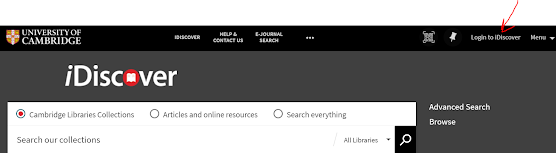
Did you know you can also check your library account via My Library Account in iDiscover. Just go to iDisc

over and login by clicking the link at the top right hand side of the screen:

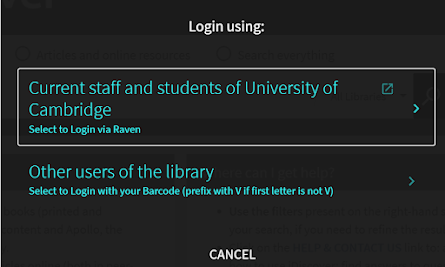
When you click on this you will see this box come up
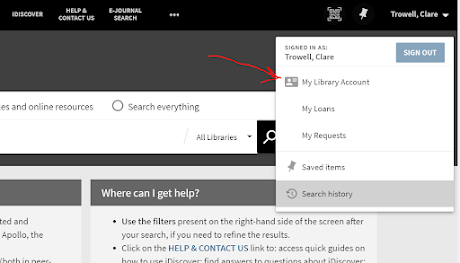
Click on the top box, which says Current staff and students of University of Cambridge select to Login via Raven. If you have not already logged in with your crsid and password you will prompted to do so at this point. Once you are logged into iDiscover you can access My Library Account via the dropdown menu next to your name (top right hand of screen):
Click on My Library Account to open up your record and you should see something like this:

 You can, of course, check this at any time convenient to you.


Friday, 30 September 2022

Welcome to the Marshall Library of Economics

 If you are a new student, or a returning student who is unfamiliar with our beautiful library, you might want to book a tour and meet us over the next couple of weeks. There are various time-slots available but places are limited. Click here to Book a Tour of the Marshall Library


Alternatively you can watch our one minute video tour here: https://www.youtube.com/watch?v=G5AEaABou0A

Everything you need to know about Cambridge Libraries online services, including how to search our catalogue iDiscover can be found on the Library Essentials Libguide. There is a Quick start introductory guide to iDiscover too, which you will have received via your Economics or Development Studies Induction or via your student Moodle page.

We have a Marshall Library Comic to introduce the friendly library team and let you know about our many services, including Click & Collect for borrowing and how to access our live financial data terminals Bloomberg & EIKON: https://www.marshall.econ.cam.ac.uk/contactus/eikon-bloomberg-booking-form


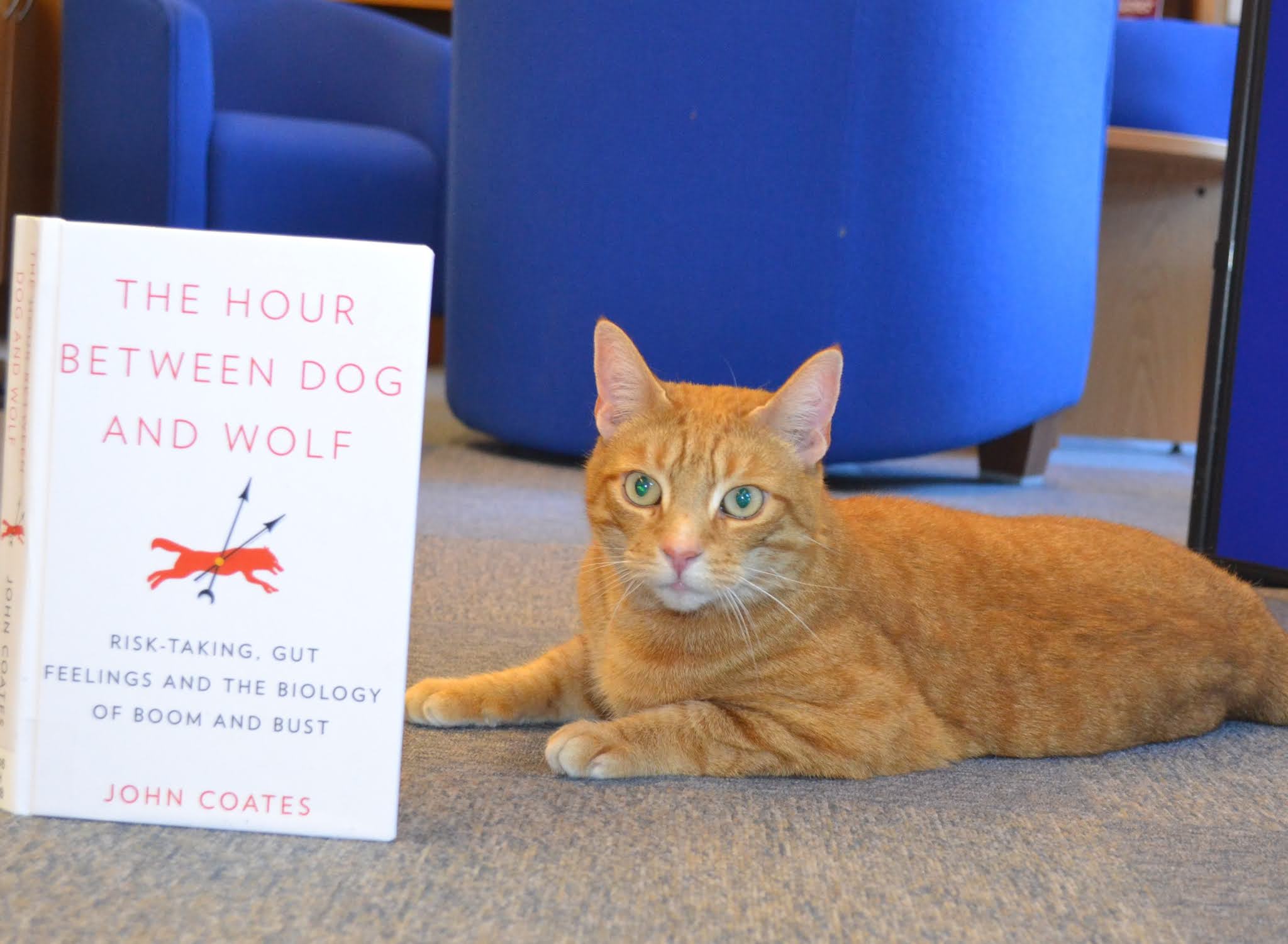
JASPER, Marshall Library mascot, the #EconomicsCat with our Bloomberg Terminal

We look forward to meeting you soon

Look out for our famous Tea with Jasper events later in Michaelmas Term too:


Wednesday, 24 November 2021

Using My Favourites lists when searching iDiscover on a keyword, topic or theme - Jasper's Xmas tips number 8

 If you are doing a literature search on a topic, e.g. Labour economics and crime for a project did you know you can use IDiscover like a database to search by keyword, topic or theme? Then you can use My Favourites in iDiscover to save your searches for later or to help you with your references.


Do a search on your keywords: labour, economics, crime in iDiscover under Articles and online resources


You will see that you get a large number of results, over 14,000 - so it is a good idea to refine or filter your results using the right hand side menus. You could choose Peer-reviewed Journals, Articles, and refine the publications to recent dates e.g. 2018-2022


Then you could start looking at the titles of the articles and deciding if they are useful for your project. As long as you have logged in you can use the little pin symbol next to each article you are interested in reading or saving to save your readings to a list 


Clicking on the pins next to articles collects them under the pin next to your name at the top right hand side of the screen 


Clicking on this pin will then bring up your list of saved readings


From here you can tick the records you want to save, print, email or download and export the reference details by using the three dots at the top to open a menu of options


Or you can sort your list into labelled lists by using the Add Labels link at the top of My Favorites


Once you have added labels they will appear at the right hand side e.g.


Really useful for organising your literature review for your project or dissertation!!!


Requesting a book that someone already has on loan - Jasper's Xmas Tip number 7


Do you really need a copy of a book at the Marshall Library  and all our copies are out? Don't worry - here's how to request a book.

1. Go to iDiscover idiscover.lib.cam.ac.uk and make sure you login via the top right hand side button

2. When you have logged in search for the book in the iDiscover Search box under Cambridge Libraries Collections e.g. Labor Economics Borjas and refine your search by choosing 'Marshall Library' from the Library list on the right hand side.


3. Click on the blue link where it says, "Available at Jesus College> Quincentenary Library and other locations". Go through the alphabetical 'Get it' list to find Marshall Library under 'M' and you will see that we have 3 copies of the book at shelfmark 63 A 135g along with a link to Click & Collect a copy of this book. Click on Marshall Library and the shelfmark to see which copies are out on loan:


4. When you click here you will be taken to a page of REQUEST OPTIONS for the Marshall Library. As long as you have logged in as yourself you will see an option in blue to 'Request' any of the copies out on loan:


5. Clicking on the Request button opens up a little form in iDiscover which shows the item, the pick up collection point as Marshall Library and an opportunity to open a calendar to show you no longer need this book after a certain date, along with a blank space for a comment:


6. When you have filled out the form click the green request button and you will be told you are number 1, 2 etc. in the queue. You can then go to your My Library Account to check for updates:


You will receive an email to your Cam Email Address when the book is ready to collect from the Marshall Library!

Monday, 22 November 2021

Finding digitised E-counter items on your Reading Lists via the Marshall Library - Xmas Tip number 3

 When you are asked to read a particular chapter or article in a book on your reading list you will find them as Ecounter items or digitised reading. We make these digitised readings available via the iDiscover Library catalogue.

If , for example, you are an Economics Tripos student asked to read this item for Part IIB Paper 2, how do you find this reference:

Carlin, W. & Soskice,D. (2015), 'Debt dynamics' in Macroeconomics: institutions, instability and the financial system, Oxford University Press, pp.516-530?

Start by searching for the book in which the relevant pages are published by searching iDiscover for the author and keywords from the title:


Using the Library Refine menu - refine to MARSHALL LIBRARY to get to the correct edition and book record. Although it says Clare College (Forbes Mellon Library) and other locations - this is the correct record. Click on the blue link to find details about the Marshall Library copies and the digitised readings under Get It:

As you can see these pages are digitised for Economics PIIB students only - click here to access the digitised reading and enter your Raven CRSID and password to access it. Once you have done this the reading will open up with a copyright cover sheet for you to read and download!


Friday, 19 November 2021

Click & Collect Marshall Library Books " Xmas Tip Number 2

 Did you know you can Click & Collect books from the Marshall Library if you only have time to call by and no time to stop and study? Order your Click & Collect book from the iDiscover catalogue and we will hold the book at the Issue Desk for you.

Go to the iDiscover catalogue and search for the book you want to borrow using keywords. You can find Marshall Library copies by selecting Marshall Library from the list under 'Library' on the right hand side of the screen


Once you have chosen the edition of the title you want to borrow click on the link and open it up - you will see an image of the book, the shelfmark of the book and where it is shelved in the Marshall Library. Underneath this is a link to "Click here  to

collect from the Marshall Library" This will take you to a form where you can fill out your details and those of the book. Once you click Submit Marshall Library staff will fetch and issue the book for you. You will receive an email as soon as your book is ready for collection. 

Come to the Marshall Library Issue Desk to pick up your book(s). See you soon!


Finding Books on the shelf at the Marshall Library .... "And other locations..." Xmas Tip Number 1

 The shelfmark system at the Marshall Library is a very straightforward running number system. Go to the catalogue iDiscover (idiscover.lib.cam.ac.uk) and search Cambridge Libraries Collections  using  keywords from the title and the author's name e.g. Churchill Nigel Knight


You will see that iDiscover tells you: 2 versions of the record exist. See all versions >

Click on the message and you will see two options - an ebook, which is shown as Online access in green and a print copy which says:


Available at Gonville & Caius College Upper Library and other locations >

Click on this... it does not mean that the book is only at Gonville & Caius College. Clicking here opens up an alphabetical list, where you will find the Marshall Library under 'M'  in that list!

Here you can see that we have 7 copies of the book and they are shelved at 13 A 33

Go to the shelves and find number 13, following the running number round the Reading Room. Look at 13 under letter A and you will find all these copies at number 33.


Then just take the book to the Issue Desk to borrow the book!

Monday, 27 September 2021

Welcome to the Marshall Library for New Students

 Welcome to Cambridge from the Marshall Library Team! 

If you are a student in Economics or Development Studies we are the Library for your course. We have a comprehensive Economics and Development Studies collection, both in print and online. We have multiple copies of all your key textbooks and, where possible, we have provided ebook access too. We also hold the Archives of Alfred Marshall and other key figures from Cambridge Economics.

The Marshall Library is based on one side of the Austin Robinson Building (opposite the main Faculty of Economics entrance) and has a surprisingly beautiful Reading Room, which you will enjoy using as a study space.

To begin with during Michaelmas Term we will be operating a Book a Study Space service for longer stays in the Library space: https://www.marshall.econ.cam.ac.uk/book-seat    but we hope to be able to open up more as term progresses. If you just want to come in and borrow/return a book or speak to us for help and advice you can just come in. Keep up to date with our current library services here: https://www.marshall.econ.cam.ac.uk/current-marshall-library-services

We strongly recommend that you watch our Library Induction talks either in person, or via recordings on your Moodle Induction pages. For a flavour of our space and services please watch our brief video Introduction to the Marshall Library: https://bit.ly/3EU2CYO

We have a useful website which gives you all the information about the Library, our services and our resources such as online databases and datasets: https://www.marshall.econ.cam.ac.uk/

To find resources you need for your studies it is important that you learn how to use the catalogue iDiscover: https://idiscover.lib.cam.ac.uk/
We have shared the Economics iDiscover workbook with you and really recommend you spend a short time doing this to get the best out of the catalogue and save time later!


For basic tips about using Cambridge Libraries, including searching iDiscover check out the Library Essentials Libguide

If you cannot find a book, journal article, database or dataset then just ask us! All the Marshall Library staff are very friendly. We are here to help you and look forward to seeing you soon in the Library.

Keep in touch by following us on Twitter @Marshalllibrary and on Facebook: https://www.facebook.com/MarshallLib


You are likely to see our mascot, Jasper the #Economicscat on Twitter and, hopefully, in catperson, at the Library where he makes a couple of visits each year