Friday, 26 November 2021

Referencing for Economists using the Cambridge Economics Libguide - Jasper's Xmas tip number 12

 If you are new to referencing in Economics take a look at the useful Economics Referencing Guide, which is part of the Economics subject Libguide. The Faculty of Economics recommends the Cite them right Harvard (Author-Date) referencing style, which is explained very clearly in the Economics Referencing Guide.


The Faculty do not mind if you use other referencing systems, as long as you are consistent. However, if you are new to referencing it can be really useful to start with this simple system. On the right hand side of the page you will see some clickable links, which show you exactly how to set out a reference for a particular type of resource


There is also a link to the Cite them right website, which has even more examples, videos and explanations about this Author-Date system.

We hope you have found Jasper's Twelve Christmas Tips really useful - Happy Christmas from Jasper and all the Marshall Library Team!


Libguides to help with Study Skills - Jasper's Xmas tip number 11

 Jasper #EconomicsCat recommends Cambridge Libguides for help with your study skills: https://libguides.cam.ac.uk/skills


The Study Skills Libguide page has everything you might need from Copyright advice, creating a Conference Poster, Good Academic Practice and Avoiding Plagiarism, Reflective Practice through to more specialist advice such as how to do a Systematic Review, Text & Data Mining and Reference Mangement. There are also Reference Management guides for particular software such as Mendeley and Zotero.

This could be really useful over the Christmas Vacation when you may be working on your own independent projects or essays.

Thursday, 25 November 2021

Setting your Google Scholar Preferences: Jasper's Xmas tip number 10

Why not just use Google to find information?


Problems with just googling information include not seeing all the information, data and literature available. You need to search in various places to get a good impression of work already done on your topic. Jasper recommends searching for scholarly information on Google Scholar


It is advisable to set your Google Preferences in Settings before you start, to make sure you do not miss out on full text links to Cambridge subscribed electronic resources e.g. journal articles. To do so click on the three lines at the top left of the Google Scholar screen to open up the Google Scholar menu - scroll right to the bottom to Settings

From the Settings Menu go to the Library Links option, third option down the list.


Type "University of Cambridge" into the search box and tick the boxes for 

University of Cambridge - ejournals@cambrigde

Open WorldCat Library Search

Make sure you turn on cookies to retain settings on your devices and then click the blue Save button.

Now when you search Google Scholar if Cambridge has access to the articles that come up you will be able to click straight through for Full Text Access!

Finding Data at the Marshall Library - Jasper's Xmas tips number 9

 Looking for data for your own independent project, dissertation or research? At Marshall Library we subscribe to a variety of Macroeconomic, Microeconomic and Financial datasets. We also curate lists of free to access data. We also have bookable Live Financial Bloomberg and EIKON data terminals at the Marshall Library.


Here is a list of datasets, split by Microeconomic, Macroeconomics, Finance and Statistics on the Marshall Library website: https://www.marshall.econ.cam.ac.uk/onlineresources/economic-data

You will also find a link to Data sources for replication studies from this page.

If you know what dataset you are looking and want to know if it is free to access for members of Cambridge University go to our A-Z list here: https://www.marshall.econ.cam.ac.uk/z-datasets-list We have over 60 subscribed and free-to-access datasets on this list. The left hand column lists the datasets or sites by name in alphabetical order. The middle column tells you about the database or dataset and the right hand column tells you whether access is unrestricted or if you need to set up an account/register/contact Cambridge Judge Business School etc.


If you know you would like to use the Bloomberg or EIKON terminal please book using our booking form here: https://www.marshall.econ.cam.ac.uk/contactus/eikon-bloomberg-booking-form
Please describe the type of data you are looking for - name, time series, frequency, date range etc. 


Wednesday, 24 November 2021

Using My Favourites lists when searching iDiscover on a keyword, topic or theme - Jasper's Xmas tips number 8

 If you are doing a literature search on a topic, e.g. Labour economics and crime for a project did you know you can use IDiscover like a database to search by keyword, topic or theme? Then you can use My Favourites in iDiscover to save your searches for later or to help you with your references.


Do a search on your keywords: labour, economics, crime in iDiscover under Articles and online resources


You will see that you get a large number of results, over 14,000 - so it is a good idea to refine or filter your results using the right hand side menus. You could choose Peer-reviewed Journals, Articles, and refine the publications to recent dates e.g. 2018-2022


Then you could start looking at the titles of the articles and deciding if they are useful for your project. As long as you have logged in you can use the little pin symbol next to each article you are interested in reading or saving to save your readings to a list 


Clicking on the pins next to articles collects them under the pin next to your name at the top right hand side of the screen 


Clicking on this pin will then bring up your list of saved readings


From here you can tick the records you want to save, print, email or download and export the reference details by using the three dots at the top to open a menu of options


Or you can sort your list into labelled lists by using the Add Labels link at the top of My Favorites


Once you have added labels they will appear at the right hand side e.g.


Really useful for organising your literature review for your project or dissertation!!!


Requesting a book that someone already has on loan - Jasper's Xmas Tip number 7


Do you really need a copy of a book at the Marshall Library  and all our copies are out? Don't worry - here's how to request a book.

1. Go to iDiscover idiscover.lib.cam.ac.uk and make sure you login via the top right hand side button

2. When you have logged in search for the book in the iDiscover Search box under Cambridge Libraries Collections e.g. Labor Economics Borjas and refine your search by choosing 'Marshall Library' from the Library list on the right hand side.


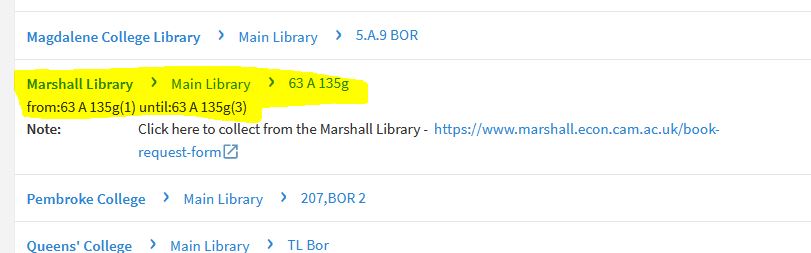
3. Click on the blue link where it says, "Available at Jesus College> Quincentenary Library and other locations". Go through the alphabetical 'Get it' list to find Marshall Library under 'M' and you will see that we have 3 copies of the book at shelfmark 63 A 135g along with a link to Click & Collect a copy of this book. Click on Marshall Library and the shelfmark to see which copies are out on loan:


4. When you click here you will be taken to a page of REQUEST OPTIONS for the Marshall Library. As long as you have logged in as yourself you will see an option in blue to 'Request' any of the copies out on loan:


5. Clicking on the Request button opens up a little form in iDiscover which shows the item, the pick up collection point as Marshall Library and an opportunity to open a calendar to show you no longer need this book after a certain date, along with a blank space for a comment:


6. When you have filled out the form click the green request button and you will be told you are number 1, 2 etc. in the queue. You can then go to your My Library Account to check for updates:


You will receive an email to your Cam Email Address when the book is ready to collect from the Marshall Library!

Monday, 22 November 2021

Newspapers and FT.com at the Marshall Library - Jasper's Xmas Tip number 6

Print Newspapers

Fancy reading a daily print newspaper? During term-time we subscribe to The Times, The Daily Telegraph, Financial Times and The Economist.


You can find them by our easy chairs in the Reading Room.

Online Newspapers

You can access The Economist online by searching for The Economist on iDiscover via Proquest. Or you can go to the useful Newspapers Libguide: https://libguides.cam.ac.uk/newspapers

Here you will find many national and international newspaper archives on the left hand side under Newspaper Archives. Under Current newspapers on the right hand side of the guide under the picture you will find direct links to theo Economist, and the Financial Times. Clicking on this page takes you to a page that explains how to access FT.com online and how to register and set up your own account, so you can read FT.com on your own laptop, tablet, device or phone.

Also under Current newspapers you will find links to aggregator newspaper services e.g. Lexis Nexis and Factiva. These are great places to search for a particular news story or search by topic or theme. Lexis Nexis only covers UK news but Factiva is international, so you can find regional and national newspaper stories from across Europe and the US.